Verify Crypto Project Telegram Contacts: Agency Checklist

Your email to a token project bounced. The spreadsheet lists one Telegram handle. The project's website points to another.
If your agency sells services to token projects, choosing the more familiar profile leaves an important question unanswered: what connects that route to the team, and what is it for?
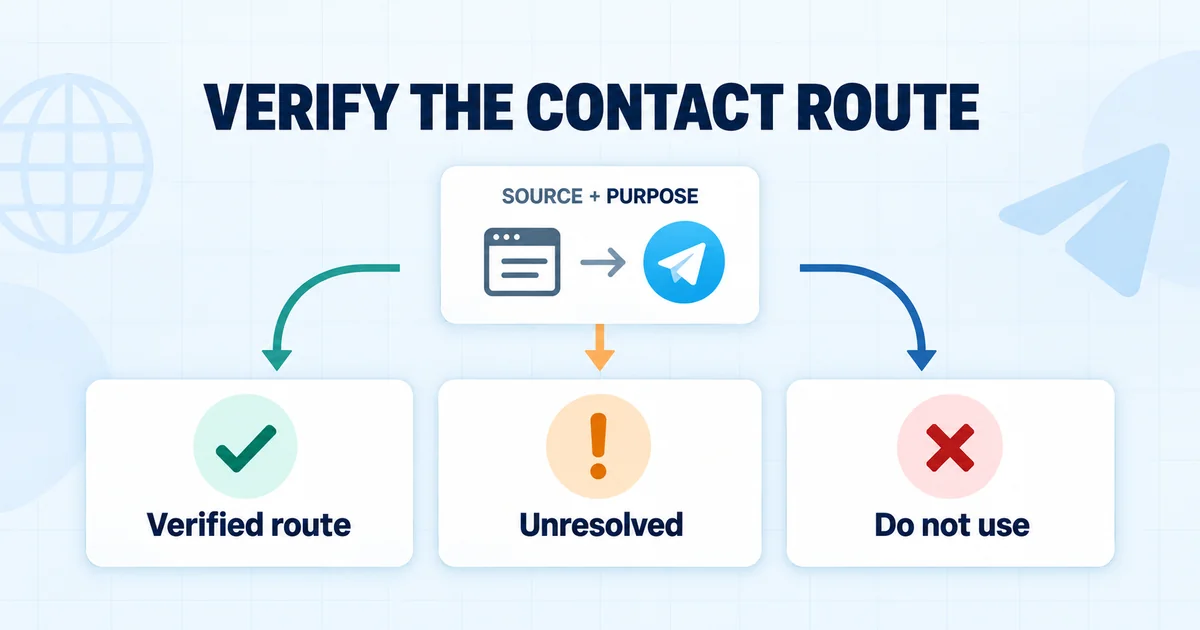
To verify crypto project Telegram contacts, trace the source, establish the published purpose, and record any conflict. This checklist gives you a contact evidence card and three possible outcomes: Verified route, Unresolved, or Do not use.
Before another colleague picks up the account, make the contact decision reviewable.
- Treat the bounce as a reason to inspect the existing project record.
- Trace each candidate Telegram route to current project-controlled sources and routing instructions.
- Separate a stated business purpose from community, support, or announcement functions.
- Record a decision and its evidence; preserve unresolved conflicts instead of guessing.
- Keep consent, opt-outs, account ownership, and any outreach approval separate from route verification.
A bounce opens a record review
A failed delivery tells you to inspect the email attempt. It does not explain which Telegram route to use. Without the delivery details, you cannot determine whether the address is outdated, the mailbox is unavailable, or something else failed. Use the email validation and list hygiene guide to investigate that part.
For the contact-route review, start with the information your agency already holds:
- Project website, token name, and symbol.
- Blockchain and token reference, where relevant.
- Source of the email address and each Telegram link.
- Previous conversations or routing instructions.
- Account owner, opt-outs, and suppression decisions.
Keep the bounce and the Telegram investigation attached to the same project record. Creating a fresh prospect can hide the history from the next operator.
A matching name or token symbol is not enough to establish project identity. Compare the website and available project references first. If the entire record is stale, the guide to contact freshness and static-list problems covers that wider issue.
Once the record is assembled, investigate where each handle came from.
Verify Telegram contacts through project-controlled sources
A useful verification record shows the source page, the destination, and the purpose described beside it. A handle copied into a sheet without that context leaves your colleague guessing.
Read the source page, not just the handle
Start with the website recorded for the project and check that it still represents the project you intend to research. Look at contact pages, documentation, support pages, and linked profiles.
Read the words around the Telegram link. These labels describe different uses:
- Business enquiries.
- Partnerships.
- Technical support.
- Community.
- Announcements.
Record what the source says. If it says “Join our community,” do not rewrite that as “Contact the marketing team.” An unlabeled Telegram icon establishes less about purpose than a contact page with explicit business-routing instructions.
Follow the published link and compare the actual destination with the route in your record. Note a different username, destination type, or conflicting description. Do not quietly replace the original value.
Cross-check the connection and purpose
Where available, compare the route with another current project-controlled reference. Documentation may point to the contact page. A linked profile may repeat the same business instructions. An established conversation may explain a change.
The relationship between sources matters more than the number of pages repeating a handle. Several directories may have copied the same old entry.
| Observation | What it supports | What it leaves unanswered |
|---|---|---|
| A project contact page links to an account | The project publishes that destination | Whether it remains current and suits your enquiry |
| The page labels the route “Business enquiries” | A stated business purpose | Purchasing authority and permission for your proposal |
| A community page names a moderator | A community role | Responsibility for partnerships or buying services |
| An older directory lists a handle | A historical reference to investigate | Current affiliation and purpose |
Save the source wording before drawing a conclusion. “The contact page labels this route ‘Partnerships’” is a reviewable observation. “Looks like the right person” is not.
Understand what verification badges can tell you
Telegram's page verification guidelines explain that its verification identifies official channels, groups, and bots. It does not endorse their content. The guidelines also distinguish Telegram's own checkmark from third-party verification icons, which have information in the profile.
That makes a badge one piece of evidence. It does not identify who buys your service or authorize a pitch. An absent badge also does not settle whether a business contact is legitimate.
In this checklist, Verified route is your agency's recorded evidence decision. It is not a Telegram badge or a LeadGenCrypto product status. Project-published links can still be outdated or compromised, so record the date checked and the limits of your conclusion.
Separate a business contact from a community route
A destination can belong to the correct project and still serve the wrong purpose for your enquiry. Classify its published function before deciding what to do with it.
| Route type | Evidence to look for | How to record it |
|---|---|---|
| Business contact | Explicit project-published business-routing instructions | Record the stated purpose and source |
| Support contact | Product or account support instructions | Retain the support purpose |
| Community group | Group description, rules, and administrator roles | Record the community function and restrictions |
| Announcement channel | Broadcast updates and publication information | Treat it as an information source |
| Unclear account | A handle with no sufficient affiliation or purpose evidence | Mark the purpose unresolved |
If a group prohibits promotional messages, retain that restriction. A strong service fit does not change the group's rules. Likewise, a moderator answering community questions does not establish responsibility for evaluating your agency.
If the project publishes several routes with clearly different functions, that can explain the difference. If two sources claim different routes for the same function, investigate the conflict.
Resolve conflicting handles and project changes
Keep contradictory evidence visible until you can explain it. Choosing the easiest handle to reach does not resolve the discrepancy.
When two official pages disagree
Check four things:
- Do both pages describe the same project?
- Do the destinations serve different stated functions?
- Does a project announcement explain an account or routing change?
- Can you establish which instructions remain current?
A recent page date alone is not decisive. The page may still contain an old footer or copied contact details. Record both references and the unanswered question.
If the conflict remains unresolved, hold contact through that route. A guessed message asking whether you guessed correctly is not a substitute for verification.
When a project changes its name or domain
Look for a project-published connection between the old and new references, such as an announcement explaining the change. Keep the earlier identity in the record until continuity is clear.
A new token address does not, by itself, establish a new team. A shared symbol or similar profile picture does not establish the same team. Use the project's own continuity evidence alongside the existing account history.
If you already have an appropriate, established conversation with the project, a routing clarification there may resolve the gap. Otherwise, leave the record unresolved until better evidence appears.
Record Verified route, Unresolved, or Do not use
The next operator should be able to understand your decision without repeating the investigation. Use a short reason tied to the evidence, with the outreach decision recorded separately.
Apply the decision matrix
| Decision | When it fits | Next internal action |
|---|---|---|
| Verified route | Current project references establish the destination and a relevant business purpose; no unresolved contradiction was found | Save the evidence, then assess any proposed outreach separately |
| Unresolved | Project connection, purpose, or conflicting instructions cannot be settled | Hold contact through this route and record the missing evidence |
| Do not use | The route belongs to the wrong project, serves an inappropriate purpose, or has a restriction ruling out the intended use | Save the reason so another operator does not repeat the attempt |
A verified route can coexist with Outreach stopped. That combination means you established what the route is, while an opt-out or another stop condition still prevents contact.
Copy the project contact evidence card
These are suggested fields for your agency's own record, not claimed LeadGenCrypto features.
Project name:
Project website:
Blockchain and token reference, if relevant:

Existing account owner:
Previous conversation or routing instruction:
Existing opt-out or suppression status:

Candidate Telegram route:
Source page URL:
Source wording describing the route:
Additional project-controlled reference:
Date checked:

Stated route purpose:
Conflicting or missing evidence:

Route decision: Verified route / Unresolved / Do not use
Decision reason:
Reviewer:
Next internal action:

Separate outreach status:
Reason for that outreach status:
Record only what is needed for the business-routing decision. Avoid unrelated personal details. Keep observations separate from your interpretation, and keep the card connected to the existing account owner.
If records move between a spreadsheet and a customer relationship management (CRM) system, use the CRM field-mapping and deduplication guidance to preserve the project/contact relationship. Add the evidence fields through your own process.
Three example decisions
The following are fictional scenarios, not customer cases or verified project endorsements.
Project A: a corroborated business route. Its contact page identifies a business-enquiry account, and its documentation points to that contact page. The operator records the wording and finds no contradictory instruction. Result: Verified route. Any outreach still needs a separate decision.
Project B: competing instructions. Two project-controlled pages name different accounts for the same purpose. No explanation of the change can be found. Result: Unresolved. Both sources and the missing explanation stay in the record.
Project C: a restricted community group. The project publishes a group whose rules prohibit promotional messages. No separate business-routing instruction is available. Result: Do not use the group for the agency's pitch.
The examples turn on different evidence, not on how valuable the prospect seems.
Check the stop conditions before any contact
Route verification does not reopen a stopped conversation. Review existing conversations, account ownership, consent or applicable outreach requirements, and the recipient's stated preferences before any further action.
A bounced email is not a reply, referral, or invitation to switch channels. A colleague finding another handle does not erase an opt-out. Time passing does not fix an unresolved source conflict.
Telegram's Spam FAQ advises users to contact people who expect their messages. It explains that unwanted messages can be reported and accounts restricted. Apply that boundary alongside your own outreach policy and the requirements relevant to your market. This checklist provides general operational guidance, not legal advice.
Checking a business route should not require sharing login codes, seed phrases, or private keys, connecting a wallet, or paying an unsolicited “verification” request. Stop that interaction rather than treating it as part of this checklist.
Complete the handoff review before anyone acts:
[ ] Confirm the project identity against the existing record
[ ] Record each candidate Telegram route and its source
[ ] Capture the project's wording about the route's purpose
[ ] Check additional project-controlled references where available
[ ] Preserve conflicting or missing evidence
[ ] Review account ownership, conversations, and stop conditions
[ ] Choose Verified route, Unresolved, or Do not use
[ ] Save the decision reason, check date, and reviewer
[ ] Keep the outreach decision separate from route verification
When a separate decision supports continuing on Telegram, use the email-to-Telegram handoff workflow to carry the context and preserve ownership. This investigation alone should not enroll the project in another sequence.
Where LeadGenCrypto contact data fits
Start with the project record you already have. LeadGenCrypto's documented lead fields include website, token address, blockchain, token name or symbol, verified emails, and other information. The Leads page supports CSV export.
If your existing record contains a candidate Telegram route, apply the same source and purpose checks to it. Contact data is a starting point for the investigation; the evidence card and its decisions belong to your agency's workflow.
If your agency maintains token-project contact records, review the Leads fields and CSV workflow, then attach the completed evidence card to one existing prospect.
Keep the next contact decision reviewable
Get practical contact-research and outreach checklists for service providers working with token projects.
Frequently asked questions
Does a bounced email justify contacting the project on Telegram?
No. It tells you the email attempt failed. Verify the candidate route, preserve the account history, and assess any further outreach separately.
Is a Telegram link on the official website enough?
It is useful evidence that the project publishes the destination. You still need its stated purpose and an explanation for any conflicting information. A community link does not establish a business-enquiry route.
Does a business contact need a Telegram verification badge?
An absent badge does not prove the contact is false, and a badge does not establish purchasing authority. Examine the project-controlled source trail, the destination, and the purpose. If a third-party verification icon appears, inspect what its profile explanation actually says.
Can an agency pitch inside a public community group?
Do not treat a public group as a business inbox by default. Check its function and rules. If promotional messages are prohibited, do not use it for your pitch.
What if project-controlled sources list different handles?
Record both. Look for distinct functions or a documented account change. If the difference cannot be explained, mark the route Unresolved and hold contact through it.
What if the project has changed its name or domain?
Look for project-published continuity evidence and retain the older references. Similar branding, a matching symbol, or a familiar profile picture is not enough by itself.
What if the route is verified but the project previously opted out?
Keep the opt-out in force. Record the route evidence and outreach stop status separately so a colleague cannot mistake a verified destination for approval to restart contact.
Which LeadGenCrypto information helps with this check?
The documented project identifiers and contact fields help you start with an existing record. Your agency must still check the candidate route's current project connection, stated purpose, contradictions, and suitability for the intended enquiry.