Connect OpenClaw to LeadGenCrypto
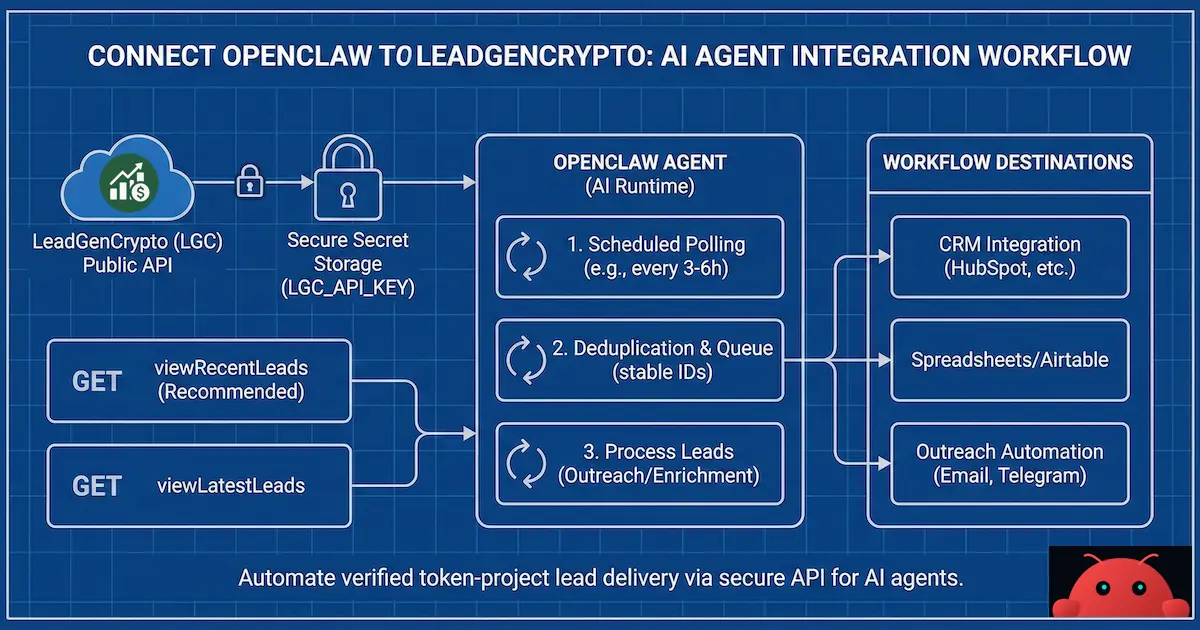
If you run an OpenClaw agent (or any AI agent platform) and you want a simple, reliable way to pull new verified token-project leads, this guide is for you. You can also get leads manually on the Leads page or connect LeadGenCrypto to your CRM. So, this guide is for OpenClaw and similar agent platforms.
You’ll create a LeadGenCrypto API key once, store it in your agent’s secret / environment variable storage (not in prompts or committed files), and your bot can start fetching leads on a schedule.
What you get with this integration
- Automatic lead delivery via API (no manual CSV export)
- Fresh leads pulled on a predictable schedule
- Easy automation into your CRM, spreadsheet, or outreach workflow
- Clear error signals for invalid keys, rate limits, and plan limits
How this guide differs from other resources. This is the only place we cover OpenClaw and AI-agent setup end to end, from API key and secrets to a full salesbot example, so you can run lead pull and outreach without a traditional CRM. For the bigger picture on lead streaming and API architecture for agencies, see our guide.
Prerequisites
Before you start, make sure you have:
- A LeadGenCrypto account with an active plan and balance; see How to Start if you’re new
- Access to OpenClaw (or your agent runtime) where you can store a secret / environment variable
- Basic ability to run a test request (optional, but recommended)
How to Start gets you from sign-up to first leads in minutes.
Option 1: Fast setup (Copy & Paste)
Step 1: Create an API key in LeadGenCrypto
Go to API Keys in the app (or see API Keys: create and manage tokens), generate a key, and copy it.
Treat your API key like a password. Do not paste it into public chat logs or commit it to Git.
Step 2: Save the API key as a secret
Copy this line and replace the value:
LGC_API_KEY=PASTE_YOUR_LGC_API_KEY_HERE
Where to put it:
- OpenClaw: store it as a secret / env var for your agent (do not hard-code it in skills, workspace files, or committed config)
- Other platforms: use their “Secrets” / “Environment Variables” feature
OpenClaw supports per-skill secret injection so your API key lives in OpenClaw’s config (not inside a skill folder, not inside the workspace, and not in Git).
A common pattern is:
- Your LeadGenCrypto skill declares it needs
LGC_API_KEY - You set the key in OpenClaw config under
skills.entries.<skillKey>.env(orskills.entries.<skillKey>.apiKeyif the skill declares a primary env var) - OpenClaw injects that value into
process.envfor the agent run, then restores the original environment afterward
This keeps secrets out of:
- prompts / chat logs
- skill markdown files
- workspace files that might get synced or committed
If you already set LGC_API_KEY at the service / process level (systemd, docker env, etc.), you can keep using that; OpenClaw’s env injection is non-overriding (it only fills missing keys).
Step 3: Test the connection (recommended)
Run:
curl "https://api.leadgencrypto.com/api?module=lead&action=viewRecentLeads&apikey=$LGC_API_KEY"
Expected results:
- You’ll receive JSON with leads from the last 24 hours, or
- An empty result if there are no new leads, or
- A clear error if the key is invalid or you hit a limit
Option 2: Ready-to-use integration block (for tool-based agents)
If your agent platform supports a “tool configuration” style, you can use this block as a starting point.
Important: keep the secret as a placeholder in this block and provide the real key via your platform’s secret/env storage. Don’t commit real keys.
name: leadgencrypto
description: Pull verified token-project leads from LeadGenCrypto (read-only).
secrets:
  LGC_API_KEY: PASTE_YOUR_LGC_API_KEY_HERE

endpoints:
  base_url: "https://api.leadgencrypto.com/api"

actions:
  view_recent_leads:
    method: GET
    path: ""
    query:
      module: "lead"
      action: "viewRecentLeads"
      apikey: "${LGC_API_KEY}"
    output_hint: "Returns leads created in the last 24 hours."

  view_latest_leads:
    method: GET
    path: ""
    query:
      module: "lead"
      action: "viewLatestLeads"
      limit: 25
      apikey: "${LGC_API_KEY}"
    output_hint: "Returns the latest N leads. You can change limit."
Recommended agent workflow (how your bot should run)
1) Poll on a schedule (simple and reliable)
A practical starting schedule:
- Every 3–6 hours: call
viewRecentLeads
Why:
- It reduces the chance of hitting rate limits
- It keeps lead ingestion consistent and easy to monitor
2) De-duplicate leads so you don’t process repeats
Store a “processed” set using one or more of these stable identifiers:
tokenAddress + blockchaintokenUrlemail1website
You can also sync exceptions and suppression lists so you avoid re-contacting the same projects across tools.
3) Send leads to your next step
Typical next steps:
- Push into a CRM (HubSpot, Pipedrive, etc.), or follow our 6-step CRM pipeline for token project outreach for stages and automation
- Append to Google Sheets / Airtable
- Trigger outreach generation (email/Telegram scripts)
- Run enrichment (company lookup, chain stats, website scan)
API calls you’ll use most
For full parameters and rate limits, see Public API: Quick Reference.
Get leads created in the last 24 hours (recommended)
GET https://api.leadgencrypto.com/api?module=lead&action=viewRecentLeads&apikey=YOUR_KEY
Get the latest leads (use with a reasonable limit)
GET https://api.leadgencrypto.com/api?module=lead&action=viewLatestLeads&limit=25&apikey=YOUR_KEY
Common errors and how to fix them
Error: invalid api key
What it means: the key is wrong, deleted, or expired.
Fix:
- Generate a new API key in LeadGenCrypto (API Keys)
- Replace the key in your OpenClaw secrets
- Re-run the test request
Error: rate limited / too many requests
What it means: your agent is polling too frequently.
Fix:
- Increase your polling interval (e.g., poll every 3–6 hours)
- Prefer
viewRecentLeadsfor scheduled pulls
Error: limit exceeds plan maximum
What it means: you requested too many leads in one call. Your API Keys page shows the max leads per call for your plan.
Fix:
- Lower the
limitvalue - Or upgrade your plan if you need a higher daily capacity
Security best practices (important)
- Never hard-code your API key in code repositories
- Use secrets management (OpenClaw secrets / env vars)
- Rotate keys if you suspect exposure
- If multiple agents run under one owner, consider using separate keys per agent to simplify debugging and access control
Troubleshooting checklist (quick)
- No leads returned
- Check that your plan is active and your balance is sufficient; top up if needed
- Try
viewLatestLeads&limit=10to confirm you can retrieve any records
- Errors keep repeating
- Confirm the key is correct (no extra spaces)
- Reduce polling frequency
- Lower
limit
- Leads look duplicated
- Implement de-duplication using
tokenAddress + blockchainortokenUrl
Example: OpenClaw “salesbot” outreach pipeline (LeadGenCrypto → sales emails)
This is a practical, production-style example where an OpenClaw agent named salesbot:
- pulls new leads from LeadGenCrypto,
- deduplicates and queues them locally,
- sends slow, paced outreach emails using placeholders (for a trust-first cold email protocol when reaching out to token teams, see our agency guide),
- keeps an audit log and basic reporting.
Assumption: salesbot already knows how to send emails from your mailbox using placeholders (e.g., via Gmail/SMTP tooling), and you want LeadGenCrypto to be the lead source.
Data fields you’ll typically use
LeadGenCrypto returns lead objects that commonly include:
websitetokenNametokenSymbolblockchaintokenAddresstokenUrlemail1(primary)email2(secondary)telegram
In outreach, you usually map these into placeholders like:
{{email}}→email1(fallback toemail2){{website}}→website{{token_name}}→tokenName{{token_symbol}}→tokenSymbol{{blockchain}}→blockchain{{token_address}}→tokenAddress{{token_url}}→tokenUrl{{telegram}}→telegram
Workspace schema (files you keep on disk)
Here’s a simple, robust layout (inside the salesbot workspace):
workspace/salesbot/
  leads/
    lgc_queue.jsonl            # queue of new leads (1 JSON per line)
  state/
    lgc_processed.json         # set / map of "seen IDs" (dedupe registry)
    lgc_last_run.json          # last run metadata (stats/errors)
    outreach_sent.jsonl        # send history (audit trail)
  templates/
    outreach_email.md          # (optional) email template with placeholders
  skills/
    lgc-fetch-leads/
      SKILL.md                 # fetch leads from LeadGenCrypto Public API (read-only)
    lgc-ingest-dedupe-queue/
      SKILL.md                 # normalize + dedupe + append to queue
    salesbot-outreach-run/
      SKILL.md                 # pick next lead -> fill placeholders -> send email -> log + update state
Why this works:
leads/lgc_queue.jsonlis append-only and easy to debugstate/lgc_processed.jsonprevents re-processing the same leadstate/outreach_sent.jsonlis your audit trail for deliverability and “what was sent”- skills are isolated to this agent
File templates (copy/paste)
1) leads/lgc_queue.jsonl (queue)
One JSON object per line. Recommended minimal shape:
{"id":"Base:0xabc123...|contact@project.example","createdAt":"2026-02-16T10:12:00Z","website":"https://project.example","tokenName":"Project ABC","tokenSymbol":"ABC","blockchain":"Base","tokenAddress":"0xabc123...","tokenUrl":"https://...","email":"contact@project.example","telegram":"https://t.me/project"}
Notes:
idshould be stable. A good default is:{blockchain}:{tokenAddress}|{primaryEmail}- Store only what you actually use for outreach (reduce PII surface)
2) state/lgc_processed.json (dedupe set)
A JSON object keyed by id. Keep it small and stable:
{
  "Base:0xabc123...|contact@project.example": {
    "firstSeenAt": "2026-02-16T10:12:10Z",
    "source": "viewRecentLeads"
  }
}
3) state/lgc_last_run.json (last fetch metadata)
{
  "lastFetchAt": "2026-02-16T10:12:10Z",
  "endpoint": "viewRecentLeads",
  "fetchedCount": 12,
  "newQueuedCount": 3,
  "errors": null
}
4) state/outreach_sent.jsonl (audit log)
One JSON object per sent email (append-only):
{"sentAt":"2026-02-16T11:00:00Z","leadId":"Base:0xabc123...|contact@project.example","to":"contact@project.example","subject":"Quick question about ABC on Base","template":"outreach_email.md","status":"sent","messageId":"<provider-message-id>"}
5) templates/outreach_email.md (sales letter template)
This is intentionally short and personalized. Keep placeholders consistent:
Subject: Quick question about {{token_symbol}} on {{blockchain}}

Hi {{token_name}} team,

I saw {{token_symbol}} on {{blockchain}} and checked {{website}}.

If you’re preparing listings/marketing, we can help with:
- exchange listing strategy + submissions
- community growth systems
- lightweight PR + partnership outreach

If it helps, I can share 3 quick opportunities specific to {{token_symbol}} based on your current footprint.

Best,
<YOUR_NAME>
<YOUR_COMPANY>
(optional) Telegram: <YOUR_TELEGRAM>
Skill templates (OpenClaw-style)
Below are minimal SKILL.md templates you can drop into workspace/salesbot/skills/....
Skill 1: lgc-fetch-leads (read-only fetch)
---
name: lgc-fetch-leads
description: Fetch recent leads from LeadGenCrypto via Public API (read-only). Requires LGC_API_KEY.
metadata: {"openclaw":{"requires":{"env":["LGC_API_KEY"]},"primaryEnv":"LGC_API_KEY"}}
---

# lgc-fetch-leads

## Purpose
Fetch LeadGenCrypto leads without writing anything. Return normalized JSON.

## Inputs
- mode: "recent" (default) or "latest"
- limit: integer (only for "latest", default 25)

## Rules
- Never print LGC_API_KEY.
- Prefer calling viewRecentLeads for cron jobs.
- If rate limited, return a short error and stop (do not retry aggressively).

## Steps
1) Build endpoint:
   - recent: `module=lead&action=viewRecentLeads`
   - latest: `module=lead&action=viewLatestLeads&limit=<limit>`
2) Call:
   `GET https://api.leadgencrypto.com/api?...&apikey=$LGC_API_KEY`
   Use an HTTP client that does not echo the full URL with the expanded key.
3) Parse JSON and return:
   - ok / error
   - result array (can be empty)
Skill 2: lgc-ingest-dedupe-queue (queue + dedupe)
---
name: lgc-ingest-dedupe-queue
description: Dedupe LeadGenCrypto leads and append new ones to leads/lgc_queue.jsonl; update state/lgc_processed.json and state/lgc_last_run.json.
---

# lgc-ingest-dedupe-queue

## Input
A JSON response from lgc-fetch-leads (status/message/result[]).

## Output
Short summary:
- fetchedCount
- newQueuedCount
- queueSize (optional)
- any errors

## Dedupe strategy
Compute stable leadId:
- if tokenAddress + blockchain + email1 exist:
  leadId = "{blockchain}:{tokenAddress}|{email1}"
- else fallback:
  leadId = "{website}|{email1}" OR "{tokenUrl}|{email1}"

## Write targets (within workspace)
- leads/lgc_queue.jsonl (append new leads only)
- state/lgc_processed.json (mark as seen)
- state/lgc_last_run.json (store stats and any error)

## Safety
- Never delete leads from queue automatically.
- Never overwrite files without making them valid JSON.
Skill 3: salesbot-outreach-run (send slowly)
---
name: salesbot-outreach-run
description: Take 1 lead from leads/lgc_queue.jsonl, render templates/outreach_email.md placeholders, send one email (paced), log to state/outreach_sent.jsonl.
---

# salesbot-outreach-run

## Purpose
Send outreach **slowly** (1 lead per run) to protect deliverability and prevent spam bursts.

## Input
None (reads the queue).

## Steps
1) Read queue file and pick the oldest unsent lead.
2) Pick email:
   - use email1 if present, else email2
   - if no email exists: skip and log
3) Render templates/outreach_email.md using placeholders.
4) Call the existing “send email” capability (already implemented in salesbot).
5) Append to state/outreach_sent.jsonl:
   - sentAt, leadId, to, subject, status, messageId
6) Optionally mark lead as sent (either by removing from queue or by adding a sent index file).
   Prefer a sent index file to keep queue append-only if you want.

## Pacing guardrails (recommended defaults)
- Max 1 email per run
- Add jitter (random delay) if your environment supports it
- Daily cap should be enforced by the scheduler, not by this skill alone

## Output
One-line status:
- SENT (leadId, email)
- SKIP (reason)
- ERROR (short message)
Scheduling (typical)
A simple schedule:
- Every 3–6 hours:
lgc-fetch-leads→lgc-ingest-dedupe-queue - Every 60–180 minutes (business hours):
salesbot-outreach-run(sends 1 email per run)
This keeps you under API limits and avoids email bursts.
Deliverability + compliance (quick notes)
- For email authentication and deliverability setup (SPF, DKIM, DMARC) and warm-up, see our deliverability guide
- Use pacing: small daily volume, consistent cadence
- Keep an opt-out line when appropriate for your context
- Maintain a do-not-contact list if you get “no” or bounces
Next steps
- Create or manage your API key; API Keys
- Connect LeadGenCrypto to your CRM for HubSpot, Pipedrive, and others
- For a broader playbook (discovery, pipeline, outreach), see the Ultimate Guide to Crypto B2B Lead Generation. For email-sequencing automation with Instantly, see How to Use Instantly for Cold Outreach to Crypto Projects.
If you want more client conversations with new token projects, start with one free verified lead and test your workflow before scaling.
Need help?
If you have questions about plans, delivery, API limits, or balance issues, check Troubleshooting & Tips. When you contact support, please include:
- The API method you’re calling (
viewRecentLeadsorviewLatestLeads) - The exact error message (do not share your API key)
- Your polling frequency (for example: “every 60 minutes”)
Want a sales bot that works 24/7 without a traditional CRM?
We can build you a personal OpenClaw sales bot (formerly Moltbot / Claudebot) that:
- pulls leads automatically,
- personalizes outreach with placeholders,
- sends campaigns steadily,
- and runs 24/7/365 without any old-school CRM setup.
Reach out anytime at hello@leadgencrypto.com.