Overview
The Overview (Dashboard) is the first screen you see after signing up or logging in. Use it to review today's free lead, tune relevance, connect export/API workflows, and scale delivery only when you are ready.
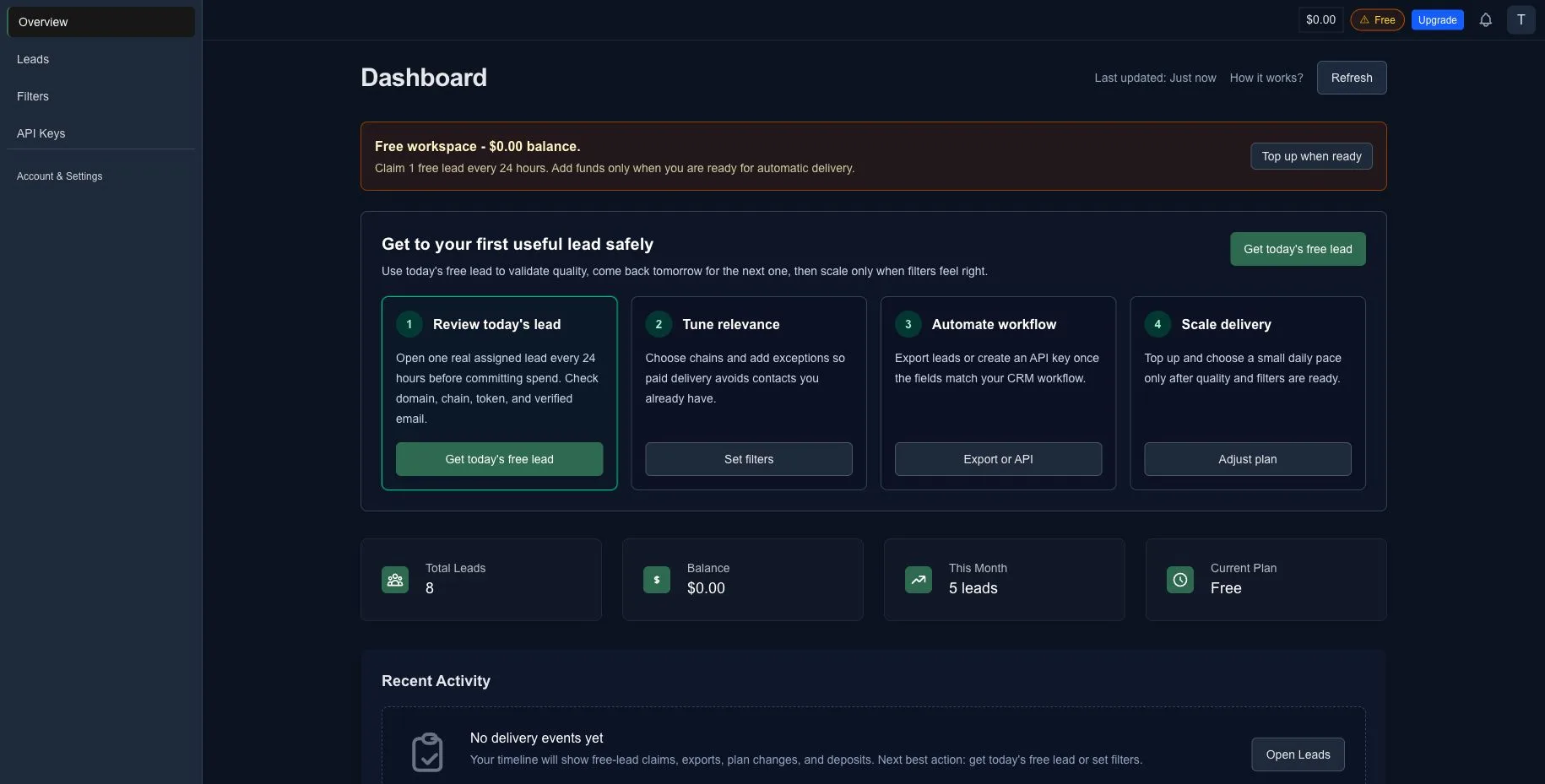
What’s on this page
1) Header (top‑right)
- Balance badge — shows your current dollar balance; click to open Payments & Subscription.
- Plan & Upgrade — the plan pill shows Free or your current paid plan; Upgrade opens the plan selector.
- Notifications bell — opens your notification history (deposits, bonuses, deliveries).
- Avatar — opens the account menu.
2) Left menu
- Overview — this dashboard page.
- Leads — get your leads (free or paid) and export them.
- Filters — choose chains and set Exceptions to avoid duplicates.
- API Keys — create/rotate tokens and view quotas.
- Account & Settings — Profile & Preferences, Payments & Subscription, and Expenses & Balance.
3) Main area
- Last updated and Refresh — reload counters on demand.
- How it works? — quick onboarding help.
- Free workspace banner — explains that you can claim 1 free lead every 24 hours and add funds only when you are ready for automatic delivery.
- Activation cockpit
- Review today's lead — open one assigned lead before committing spend.
- Tune relevance — choose chains and add exceptions.
- Automate workflow — export leads or create an API key after the fields match your CRM workflow.
- Scale delivery — top up and choose a daily pace after quality and filters are ready.
- KPI cards
- Total Leads — lifetime delivered to your account.
- Balance — current funds.
- This Month — leads delivered this calendar month.
- Current Plan — Free or your selected plan.
- Recent Activity — a timeline of free-lead claims, exports, plan changes, deposits, and deliveries. A new account can show an empty state until you claim today's free lead or set filters.
First‑day checklist
- Get today's free lead and review whether the project is worth contacting.
- Set Filters & Exceptions to tighten relevance and avoid duplicates.
- Export leads or create an API key if you want to sync into your CRM.
- Top up and choose a delivery pace when you are ready for steady volume.
Common states & what to do
- Already claimed today's lead → Come back when the 24-hour timer resets for the next free lead.
- Insufficient balance for a paid plan → Open the plan selector and use the inline Top up balance state before activation.
- Paused intake → Unpause on the Leads page to continue from the same countdown.
- No activity yet → Claim today's free lead or set filters to populate the timeline.
- Need more throughput → Open the preset-first plan selector; changes take effect after you confirm.
Why top-up comes later
LeadGenCrypto intentionally lets you validate lead quality, filters, and export/API workflow before you fund automatic delivery.
Try it now