API Keys
The API Keys page is where you generate and manage tokens used to access the Public API. API access is included on all plans.
“Public API” simply means the endpoint is reachable over the internet — not that your data is public. Requests are authenticated with your API key, and the API returns only leads allocated to your account.
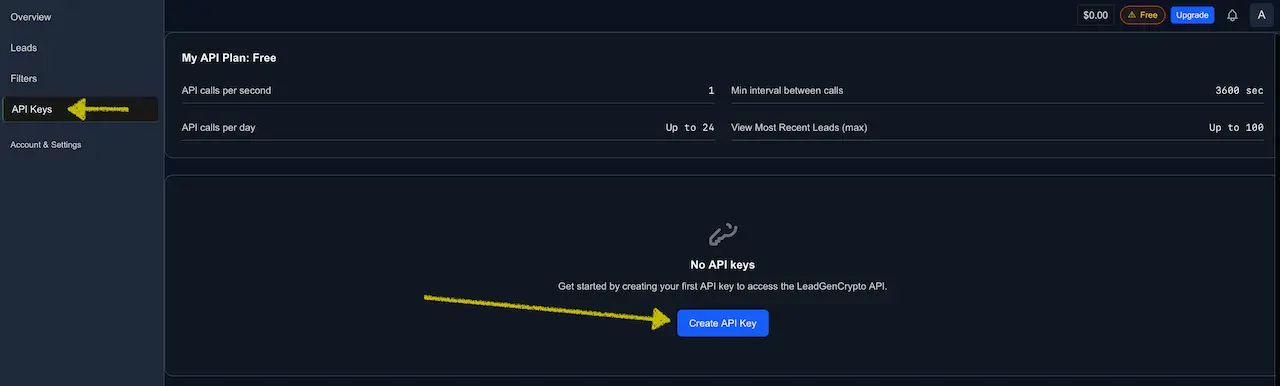
At the top of the page you’ll see your API quotas:
- API calls per second
- Minimum interval between calls
- API calls per day
- Max leads per call for the viewLatestLeads endpoint
These values can differ by plan and may be tuned by admins. The numbers you see on the page are always the ones that apply to your account right now. For a detailed table, see Public API — Rate Limits.
Respecting the per‑second, daily, and minimum‑interval limits keeps your integration reliable and prevents rate_limited errors.
Create an API key token
-
On the API Keys page, click Create API Key.
-
In the Create New API Key dialog, enter a descriptive Key Name (for example,
Prospects-inflow) and click Create Key.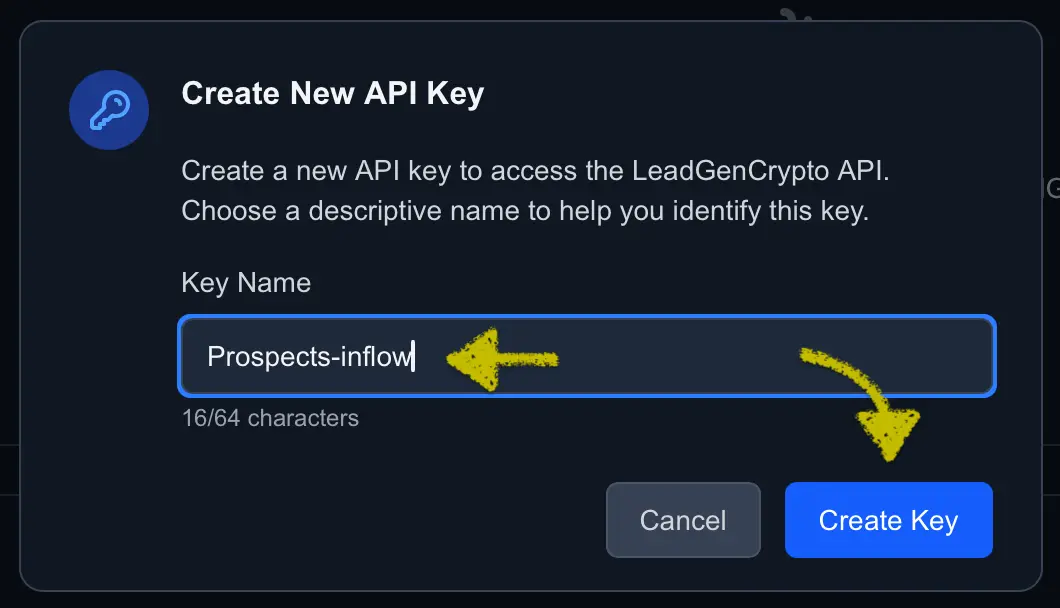
-
The platform generates a unique API Key token. Click Copy and store it in a secure place (password manager, vault, or environment variable), then click Done.
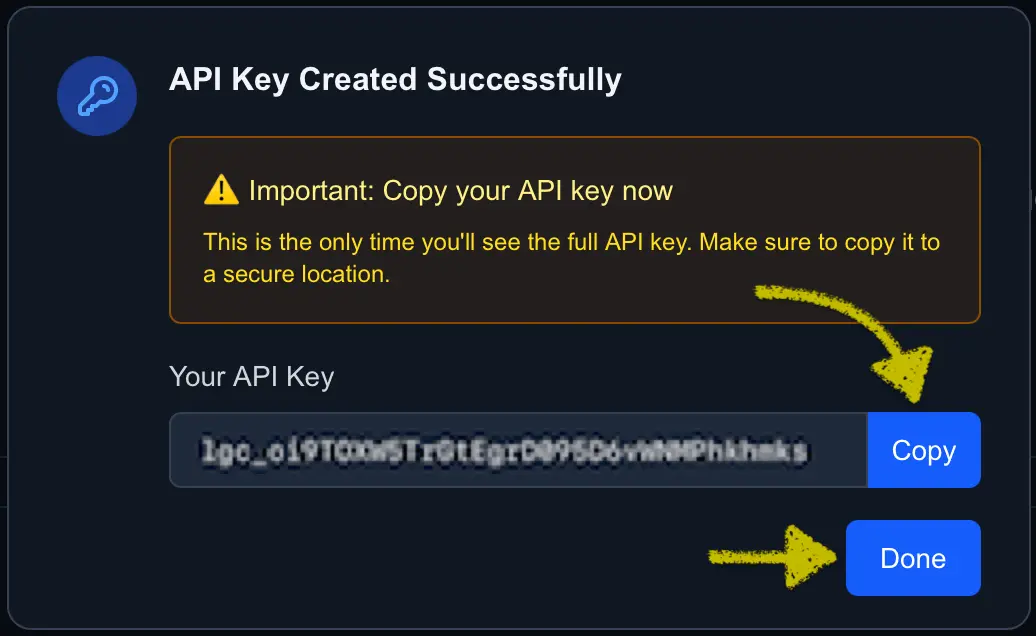
- Don’t share it in screenshots or chats.
- Don’t commit it to Git or hard‑code it in public repos.
- Store it in ENV/secret storage and rotate it if you suspect exposure.
Manage API keys
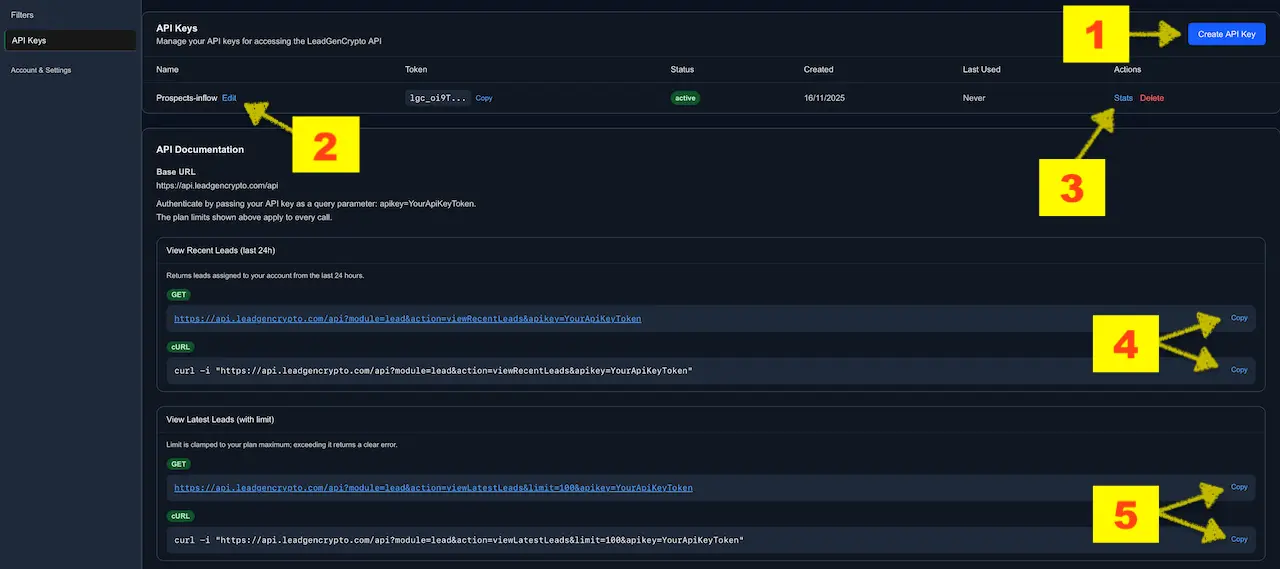
After creating a key, it appears in the API Keys table with columns for Name, Token (partial), Status, Created, Last used, and Actions.
You can:
- Create additional keys — up to three per account.
- Rename a key to keep track of which integration uses it.
- View usage stats for each key and Delete (revoke) a key when rotating or decommissioning an integration.
- View Recent Leads (last 24h) — retrieves the leads allocated to your account within the last 24 hours.
- View Latest Leads (with limit) — returns the most recent leads from your Leads table, up to
limit.
Create additional API keys
To create another key (for example, one per CRM or script):
- Click Create API Key again.
- Repeat the same steps as for your first key (name → create → copy).
Having separate keys per integration makes it easier to debug usage and revoke access safely.
Rename an API key
To change the label of a key:
- In the API Keys table, click Edit next to the key name.
- Enter a new name and save.
The token itself does not change—only the display name.
View API usage stats
Click Stats for any key to see:
- Recent requests (endpoint and timestamp)
- Status (
ok,rate_limited, etc.) - Usage over time graph for the selected window (Last hour / Last day)
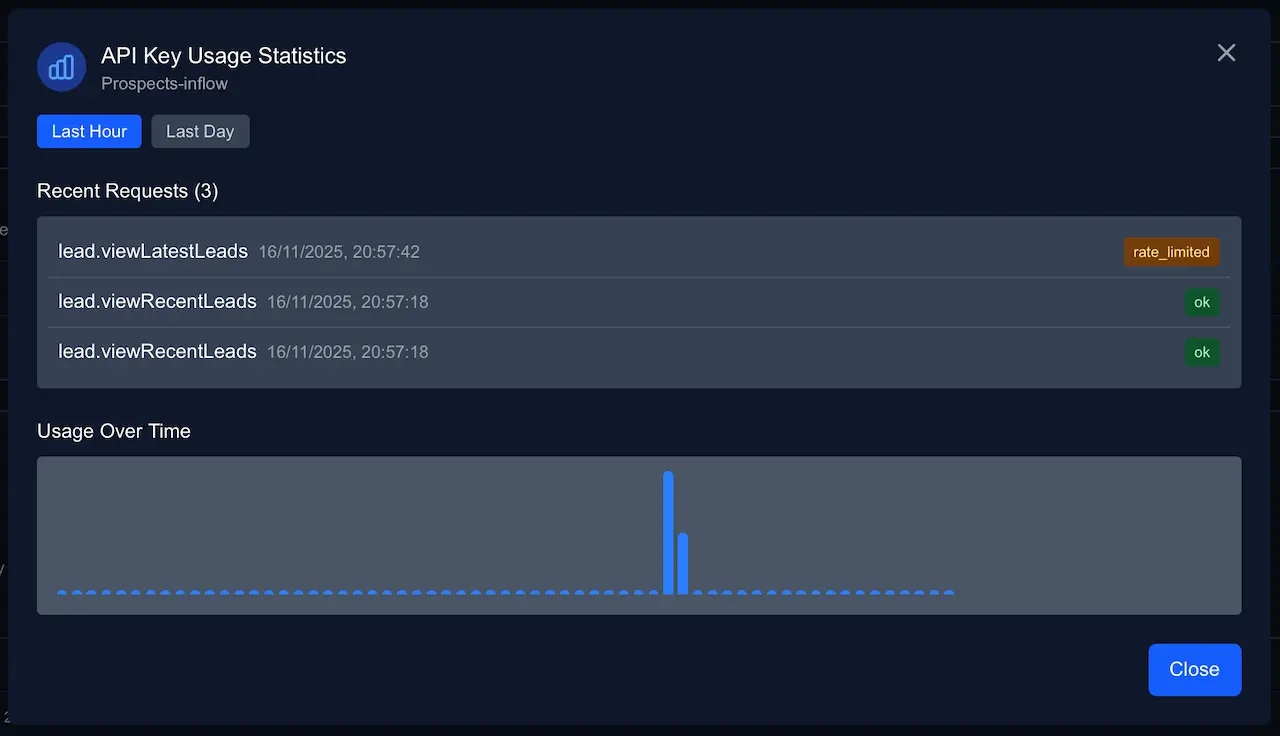
Use this view to confirm that your scheduler runs as expected and to catch integrations that hit rate limits.
Delete or rotate a key
To revoke access:
- Click Delete in the key’s row.
- Confirm the action.
Any script still using that token will start returning authentication errors, so create and deploy a new key first when rotating.
Use your key with the Public API
All requests use the same Base URL and authenticate via the apikey query parameter.
Base URL
https://api.leadgencrypto.com/api
Authentication
apikey=YourApiKeyToken
Replace YourApiKeyToken with the exact token you copied from the API Key Created dialog.
1) View Recent Leads (last 24h)
Returns leads assigned to your account from the last 24 hours.
GET URL
https://api.leadgencrypto.com/api?module=lead&action=viewRecentLeads&apikey=YourApiKeyToken
cURL
curl -i "https://api.leadgencrypto.com/api?module=lead&action=viewRecentLeads&apikey=YourApiKeyToken"
If your call is valid but no leads match (for example, nothing in the last 24 hours), result will be [].
2) View Latest Leads (with limit)
Returns the most recent leads that appear in your Leads table, up to limit.
limit is clamped to your plan maximum; if you exceed it, the API returns a clear error. When nothing qualifies, result is an empty array.
GET URL
https://api.leadgencrypto.com/api?module=lead&action=viewLatestLeads&limit=100&apikey=YourApiKeyToken
cURL
curl -i "https://api.leadgencrypto.com/api?module=lead&action=viewLatestLeads&limit=100&apikey=YourApiKeyToken"
Sample JSON response
{
  "status": "1",
  "message": "OK",
  "result": [
    {
      "createdAt": "2025-09-24T11:22:33.000Z",
      "website": "https://project.example",
      "tokenAddress": "0x...",
      "blockchain": "Ethereum",
      "tokenSymbol": "ABC",
      "tokenName": "Project ABC",
      "tokenUrl": "https://...",
      "email1": "team@project.example",
      "email2": "founder@project.example",
      "telegram": "@project"
    }
  ]
}
The API mirrors the leads you see on the Leads page. LeadGenCrypto will not re‑deliver to your account a lead with the same primary contact email or token URL that was already delivered, even via API. Use Filters & Exceptions when you want to exclude contacts you sourced elsewhere.
Example: test an API call in your browser
- Copy the GET URL for
viewLatestLeadsfrom above. - Replace
YourApiKeyTokenwith your actual API key. - Paste the final URL into your browser’s address bar and press Enter.
- You’ll see a JSON response with
status,message, and aresultlist of leads (up to your per‑call limit).
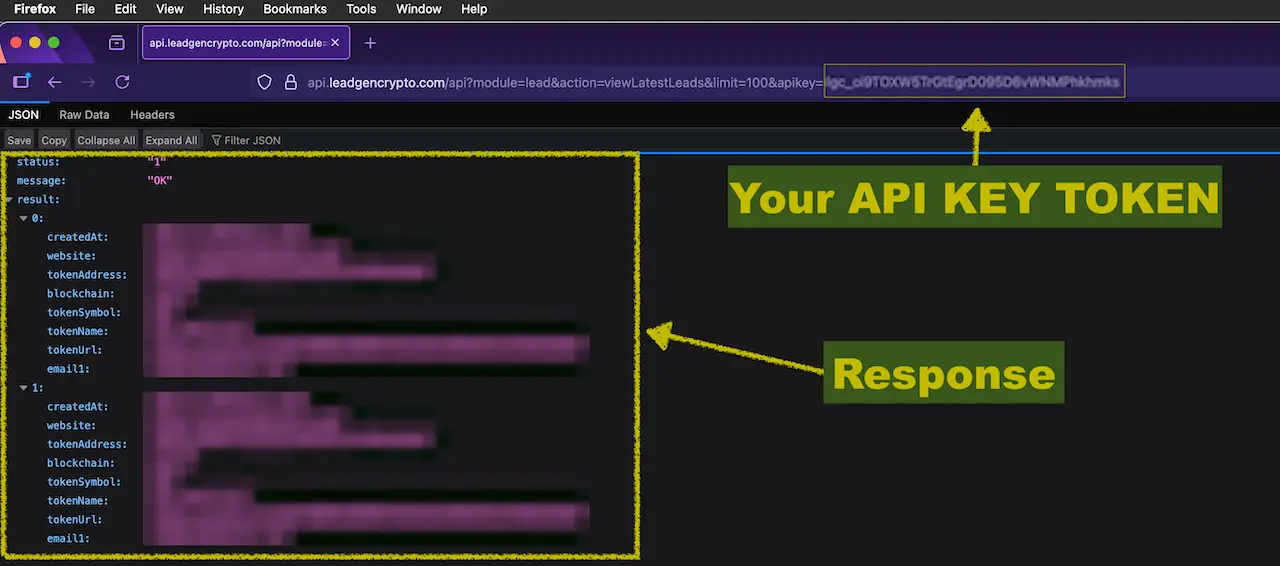
For scripts and production integrations, prefer the cURL pattern or an HTTP client in your language of choice.
When should I use GET or cURL?
-
GET URL
- Quick checks in a browser or REST client
- Fast way to confirm that your key works and quotas are sufficient
-
cURL
- Ideal for terminal users, CI jobs, and one‑off scripts
- Easy to adapt into shell scripts or language‑specific HTTP libraries
For more fields, error examples, and rate‑limit guidance, see Public API — Quick Reference.
First‑day checklist (API Keys)
- Create your first API key and store it in a secure place.
- Run a GET URL or cURL test for
viewRecentLeads. - Confirm that quotas on the API Keys page match your integration schedule.
- Note which systems use which key (name them clearly:
Zapier-sync,Internal-CRM, etc.).
Common states & what to do
-
status: "error", message: "invalid api key"→ The token is wrong, expired, or deleted. Copy it again from API Keys or create a new one. -
Frequent
rate_limitedentries in Stats → Increase the delay between calls, lowerlimit, or upgrade your plan if you need more throughput. -
Empty
result→ No leads match your query window yet. Check the Leads page and your Filters & Exceptions configuration. -
Key accidentally exposed → Delete the exposed key in API Keys, create a new one, update your ENV/secrets, and redeploy.
Power tips
- Use separate keys per integration so you can see which system generated which traffic and revoke access safely.
- Start with
viewRecentLeadsonce per minimum interval; only increase frequency orlimitafter confirming stable behavior. - Combine this page with Connect LeadGenCrypto to CRM to design an end‑to‑end pipeline from lead creation to outreach.