Find Token Projects on DexScreener for Outreach

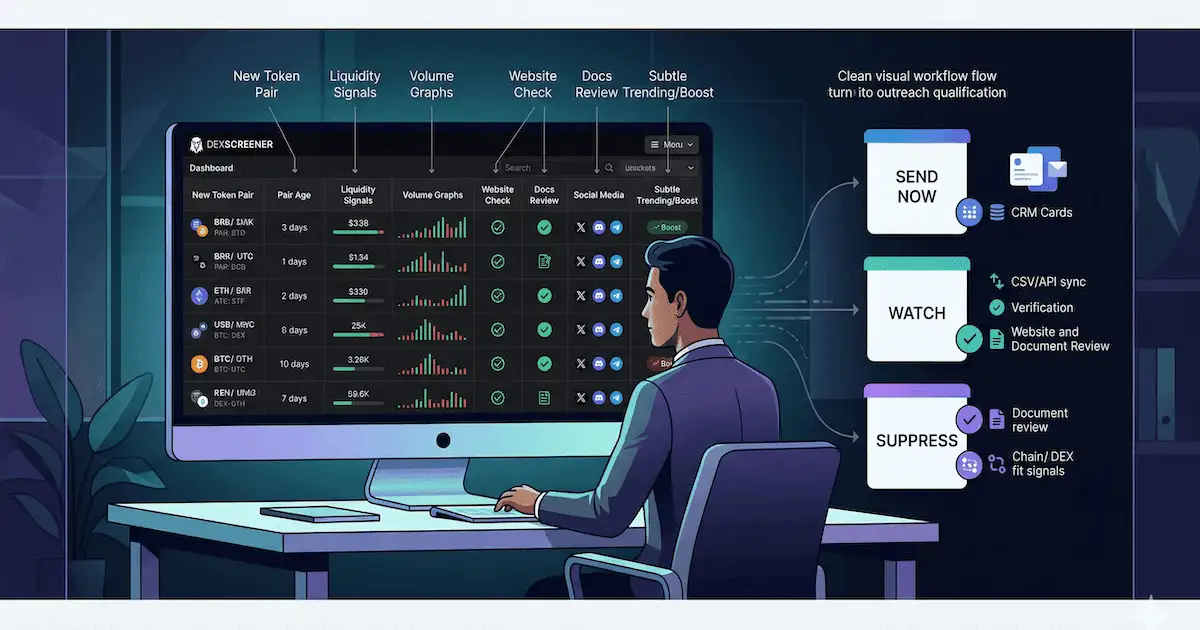
If you sell services to crypto projects, this guide shows how to find token projects on DexScreener for outreach and reach their contact details. You will use a simple four-step flow: discover new pairs, open each project page, grab the website URL, then visit the site for emails, Telegram, and other contact info to pitch your services.
How this guide differs. This page is a DexScreener-only workflow. It does not replace a multi-channel pipeline. For the broader discovery-to-CRM playbook across CMC, CoinGecko, BscScan, and other sources, see the how to find crypto projects to pitch and build a lead pipeline guide. For channel-specific deep dives, use CoinMarketCap, CoinGecko, or BscScan.
- Open DexScreener New Pairs to see recently added token projects.
- Click each project's logo to open its page.
- On the project page, find the website URL.
- Visit the project's website to find contact details (email, Telegram, etc.) and pitch your services.
This workflow is for agencies, founders, operators, and teams that need project contacts and outreach targets. This is not for token buyers, traders, or teams looking for investors. The manual process below works, but it takes time. If you are testing a new service offer, DexScreener pairs work well as a prospect list for validation sprints. For ready-made contacts, you can get verified emails with crypto project websites and token contract addresses from LeadGenCrypto at no cost.
Why use DexScreener to find token projects?
DexScreener surfaces token pairs as soon as liquidity goes live. For service providers, that means you see projects early, before they appear on larger directories. A live pair indicates real market activity, which makes it easier to tie your pitch to something concrete.
DexScreener does not, however, give you verified contact data. You still need to follow the project link to its website and pull contact details yourself.
When to use DexScreener vs CMC, CoinGecko, or BscScan
| Source | Best for | Timing | Contact data |
|---|---|---|---|
| DexScreener | Early pairs across DEXs; Solana, BSC, Base, Ethereum, Polygon | As soon as liquidity goes live | Website link only; you extract contacts manually |
| CoinMarketCap | Listed projects with market cap; broader coverage | After listing approval | Website and social links; some projects have emails in listings |
| CoinGecko | Similar to CMC; categories, trending, new coins | After listing | Website and social links; manual extraction |
| BscScan | On-chain BSC only; contract-level discovery | At token's profile update | You must follow project links |
Use DexScreener when you want the earliest possible signal on new pairs across multiple chains. Use CMC or CoinGecko when you care about listed, tracked projects. Use BscScan when you focus only on BSC and need on-chain contract signals. See launch volume by chain to plan which ecosystems to prioritize.
Chain filters quick reference (DexScreener New Pairs)
| Chain | Use case for agencies |
|---|---|
| Solana | High launch volume; memecoins, DeFi, gaming |
| BSC | Cost-efficient launches; broad project mix |
| Base | Growing L2 ecosystem; Coinbase-backed projects |
| Ethereum | Established projects; higher budget clients |
| Polygon | L2 scaling; gaming and consumer apps |
Step 1. Open the New Pairs page
Go to dexscreener.com/new-pairs. This page lists recently added token projects across chains such as Solana, BSC, Base, Ethereum, and Polygon. To decide which chains and project types fit your services, use an ICP framework for crypto startups. Then use the chain filters and sort options (Newest, Top, Gainers) to focus on the markets you serve.
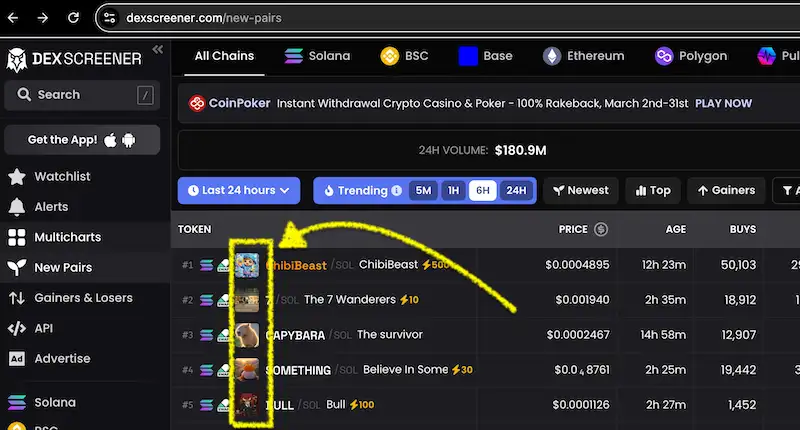
Step 2. Click on each project's logo
Each row shows a token pair with a logo on the left. Click the project's logo to open its dedicated page. The logo is the main entry point to the project details, as shown in the screenshot above.
Step 3. Find the project's website URL
On the project page, the right-hand sidebar shows links to the project's website, Twitter, Discord, and other channels. Look for the Website button to get the project's official site URL.
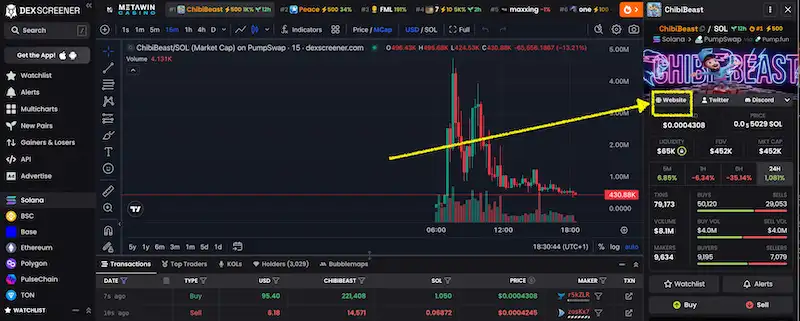
Step 4. Visit the website and get contact details
Open the project's website and look for contact information. Use this checklist so you do not miss common spots:
- Footer links (Contact, Support, Terms of Service, Privacy)
- Legal pages (Terms of Service, Privacy Policy; often contain a support or legal email)
- Social links (Telegram, Twitter, Discord; good for follow-up even if you email first)
- About or Team pages (sometimes list role-based or general contact emails)
- Docs or Help (developer docs or help centers may have a support channel)
Use the emails, Telegram, or other channels you find to pitch your services. When you reach out, mention the project by name and tie your offer to something visible (e.g., launch, docs, or product). For a full cold email protocol once you have contacts, see the step-by-step cold email guide for crypto projects. For sequence length and channel mix when pitching token projects, use the market-driven outreach guide. Before scaling, run a pre-flight checklist for list quality and deliverability.
This manual flow works but is time-consuming. For verified emails plus crypto project websites and token contract addresses delivered ready to use, get a free verified lead from LeadGenCrypto.
Where LeadGenCrypto fits
LeadGenCrypto delivers verified leads of newly launched token-based crypto projects on a daily cadence. Each lead can include a website, token address, blockchain, token name and symbol, and verified email(s). Instead of repeating the four steps above for every project, you can export leads to CSV or pull them via the Public API. Use filters and exceptions to narrow by chain and avoid duplicates. See why static contact lists fail for agencies and how fresh, verified contacts compare.
For teams still building their outreach process, the broader pipeline for finding crypto projects to pitch covers discovery, qualification, and CRM routing across multiple channels. For a structured acquisition operating system that ties sourcing to CRM and measurement, see the crypto project acquisition guide. For a repeatable CRM workflow, see the 6-step sales process for agencies selling to crypto projects.
Ready to turn this into pipeline? Claim a free token project lead and start outreach today.
LeadGenCrypto • Blog & Newsletter
Stay in the Loop on Crypto Sales Tactics
Get timely updates, practical sales advice, and useful resources for teams selling services to crypto projects, delivered straight to your inbox.
- Quick summaries of our latest articles so you can skim and decide what to read
- Actionable ideas to boost sales, reply rates, and meetings booked
- Templates and checklists you can copy into your outreach workflow
- No hype. Unsubscribe anytime with one click.
Frequently Asked Questions (FAQ)
Is DexScreener good for finding token projects to pitch services to?
Yes. DexScreener's New Pairs page shows recently added token projects across multiple chains. You can click each project's logo to open its page, find the website URL, then visit the site for contact details to pitch your services.
How do I find a token project's website on DexScreener?
On the project's DexScreener page, the right-hand sidebar includes a Website button (along with Twitter, Discord, and other links). Click it to open the project's official website, where you can look for contact details.
Where do I find contact details for token projects?
After you have the project's website from DexScreener, visit the site and check the footer, legal pages (Terms of Service, Privacy), Contact or Support pages, and social links (Telegram, Twitter, Discord). Emails are often listed in legal documents or footer links.
Does this workflow work for agencies and service providers?
Yes. This guide is for agencies, founders, operators, and teams selling services to token projects. It is not for token buyers, traders, or teams looking for investors.
Is there a faster way to get verified emails for crypto projects?
Yes. LeadGenCrypto delivers verified emails along with crypto project websites and token contract addresses. You can get a free verified lead, then use CSV export or the Public API for larger volumes.