Cold Outreach to Crypto Projects: Diagnose & Fix Your Funnel
The hype is gone. Now they need operators. Selling to a crypto project after their Token Generation Event (TGE) is fundamentally different from selling to a pre-launch startup. The "dream" is over, and the reality of market management has set in. To succeed in post-TGE cold outreach, you must stop selling "potential" and start selling "sustainability" and "risk management."
- Jump to: The Tri-Gate Framework
- Jump to: Offer Design for Live Protocols
- Jump to: The 60-Second Diagnosis
Key Takeaways:
- The "Live" Filter: Post-launch founders are not looking for hype. They are looking for stability, liquidity management, and user retention.
- The Three Gates: Every message must pass three mental hurdles: "Allow it in," "Keep consuming," and "Take a safe step."
- Maintenance over Launch: Your pitch must address the specific pains of a live token, such as exchange delisting risks or community churn.
- Trust Assets: You cannot close deals on promises. You need verified proof (live dashboards, case notes) to earn a reply.
If you are reading this, you likely sell a legitimate B2B service, such as audits, legal compliance, market making, PR, exchange listing services, or dev infrastructure, to blockchain companies.
You also likely face a brutal reality: Cold outreach to crypto projects is broken.
In traditional B2B SaaS, a 2% reply rate is mediocre. In crypto, a 2% reply rate is often considered a miracle because token teams are drowning in noise. Their DMs are flooded with "guaranteed volume" offers, fake bot sellers, and anonymous "growth partners" promising to pump their chart.
When you send a standard cold email, you aren't just fighting for attention. You are fighting to prove you aren't a criminal.
Most agencies try to fix this by writing "punchier" copy or scraping larger lists. However, the dynamic outreach fix for stale crypto databases keeps bounces and spam complaints from turning “more volume” into a faster domain burn. This is a mistake. The problem isn't your adjectives. It is your system. You are likely pitching a generic offer with a call-to-action (CTA) that feels dangerous to a risk-averse founder who is already managing a live, volatile asset. Therefore, the crypto B2B lead generation playbook is a better north star than copy tweaks, because it ties targeting, channels, and follow-ups to one pipeline.
This guide details the Crypto Tri-Gate Conversion Framework. It is a diagnostic system designed to treat your outbound motion like a machine, not a personality contest. We will cover how to engineer "safe" offers for live projects and how to use multi-channel touches (Email + X + Telegram) to break through the noise.
Phase 1: The Tri-Gate Framework (A Diagnostic System)
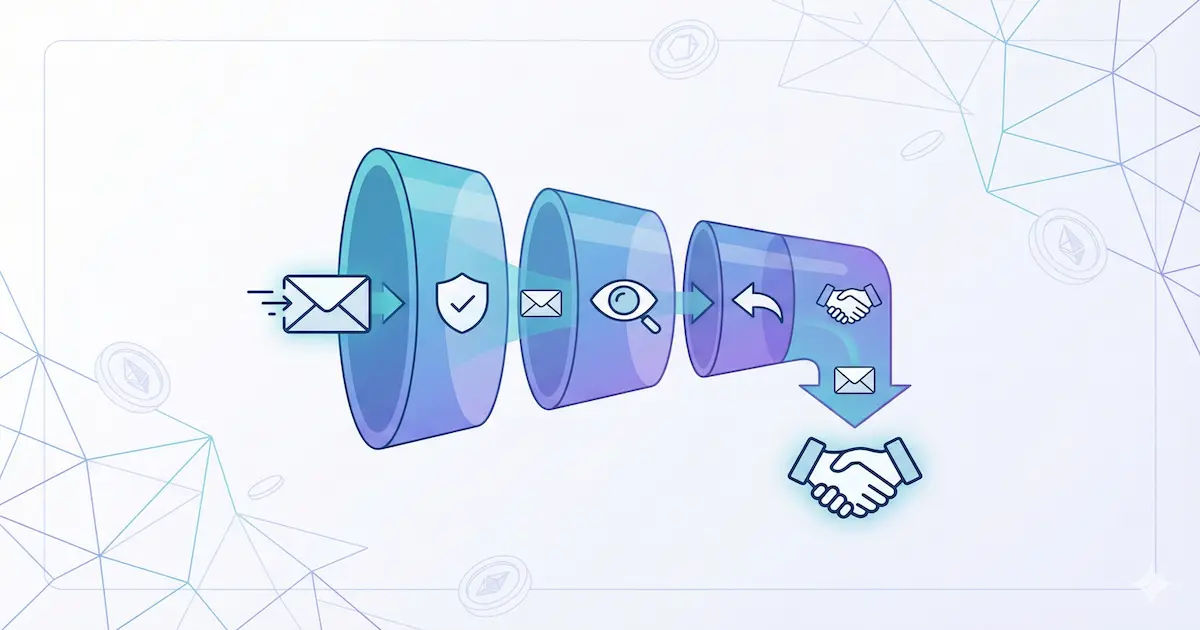
Before we write a single line of code or copy, we must understand the psychology of the recipient. When a crypto founder or Head of Growth receives a message, they do not read it linearly. They run it through three rapid mental gates. Additionally, an ideal customer profile in six steps prevents you from pitching “growth” to teams that really need ops, compliance, or liquidity triage.
If your cold outreach to crypto projects is failing, it is almost certainly failing at one specific gate.
Gate 1: Acceptance (Do They Allow It In?)
This is the bouncer at the door. It happens in a split second.
- The Technical Hurdle: Did you land in the Primary Inbox, or did you rot in Spam/Promotions? Also, the SPF/DKIM/DMARC framework for crypto deliverability lets you fix Gate 1 with DNS and alignment—not hope.
- The Mental Hurdle: When they see your Name and Subject Line, does their brain say "Delete" or "Safe"?
The Crypto Reality: Founders of live projects are terrified of phishing links that could compromise their treasury or admin keys. If your subject line screams "Partnership Opportunity" or "Guaranteed 10x," you are deleted before Gate 1. Furthermore, a short blacklist from the crypto outreach spam‑trigger words guide helps you swap hype language for boring, operator‑grade phrasing.
Gate 2: Consumption (Do They Keep Reading?)
Once opened, you have roughly 8 to 12 seconds.
- The Scan: They are skimming for keywords.
- The Question: "Is this relevant to my current hell?"
The Crypto Reality: If you start with "Hope you're well" and three sentences about your agency's history, you lose. Post-TGE teams are dealing with specific fires like "volume drop," "governance apathy," or "exchange delisting threats." They need to see their specific problem immediately.
Gate 3: Action (Do They Take the Next Step?)
This is where most "good" emails die.
- The Ask: You asked for a 30-minute call.
- The Fear: "I don't have 30 minutes to waste on a sales pitch."
The Crypto Reality: You need a "micro-commitment." Instead of a marriage proposal (a call), ask for a date (a checklist, a teardown, or a piece of value).
You cannot "persuade" your way through a broken gate. If Gate 1 is broken (deliverability/trust), rewriting the body copy (Gate 2) is a waste of time. You must diagnose which gate is blocking you and fix that first.
LeadGenCrypto • Updates
Get sharper at selling into token teams
Short, tactical emails for people doing B2B outreach to crypto projects—what to change, what to test, and what to stop doing when replies go quiet.
- Quick breakdowns of new posts (so you can skim and move on)
- Practical outreach tweaks that improve opens, replies, and booked calls
- Templates, proof lines, and “what to say next” scripts you can paste
- No noise: plain language, clear constraints, unsubscribe anytime
Phase 2: Mastering Gate 1 (Inbox & Mental Acceptance)
To pass Gate 1, you must look like a peer, not a promoter.
The "Scam Signal" Audit
Your sender identity is your first Trust Asset. In Web3, anonymity is common for users, but vendors must be hyper-transparent to be trusted.
- Real Identity: Use a real name (e.g., "Alex from LeadGenCrypto"), not "Team" or "Support."
- Real Domain: Ensure your sending domain redirects to a legitimate, high-quality website.
- Zero-Link Entry: Try not to include a link in your first cold touch. Links trigger spam filters and signal "phishing risk" to savvy crypto natives.
Subject Lines That Bypass the Filter
The goal of the subject line is not to sell. It is to set a safe expectation related to their live project status.
| Bad Subject Line (The "Marketer") | Good Subject Line (The "Operator") | Why It Works |
|---|---|---|
| 🚀 Partnership opportunity | [Project] : post-TGE liquidity reporting | Specific to live status + problem. |
| Question for the CEO | About your Tier 2 exchange gap | References a public signal. |
| Guaranteed Listing | One gap in your retention funnel | Highlights a risk, not a promise. |
| Synergy with [Agency] | Market quality baseline + reporting | Sounds like boring, useful operations. |
The "Trust Asset" Requirement
In your very first touch, you need one line that separates you from the vaporware vendors.
- The "Constraint" Signal: "We don’t do paid shilling, fake volume, or wash trading." (Admitting what you don't do builds massive trust with live projects).
- The "Specific" Signal: "We recently helped a DeFi protocol on Arbitrum stabilize their books after the recent volatility."
Phase 3: Mastering Gate 2 (The 12-Second Consume Test)
Once they open the email, you are fighting for mental bandwidth. Post-TGE teams are lean, overworked, and juggling the reality of a live market.
The "One Idea" Rule
Your email must convey one idea.
- Wrong: "We do community management, tokenomics, smart contract auditing, and PR." (This smells like a low-quality generalist).
- Right: "We help post-TGE teams fix their exchange liquidity so the chart looks organic and healthy."
The "Status + Problem + Outcome" Formula
Rewrite your opening lines to follow this structure. It proves relevance instantly.
Template: "Hi [Token_Name] team, saw you launched [Token_Symbol] token. We help live protocols get [Outcome] without [Common Risk]."
Example for a Market Maker:
"Hi FlokiFly team, saw you launched FLF token. We help teams at this stage stabilize spread and depth to avoid delisting flags, without using risky bot tactics."
Personalization Without Stalking
You don't need to know their dog's name. You need Commercial Personalization relevant to a live token.
- The Trigger: "Saw you recently deployed on Base."
- The Implication: "Usually, this is where liquidity fragmentation becomes a headache for the main pair." In addition, the CRYPTO‑10 outreach tactics that convert give you repeatable angles—value upfront, trust signals, and clean follow‑ups—without sounding like a template.
The 30-Second Research Routine
- Check their CoinGecko/CMC page for volume and markets (10s). Also, the CoinGecko Lead‑Surge framework turns that quick check into a daily habit for finding newly listed teams before their inbox is crowded.
- Check their latest blog/Medium update for roadmap items (e.g., "V2," "Staking," "Burn") (10s).
- Identify the likely owner (Head of Listings, DeFi Lead, Ops) on LinkedIn or team page (10s). Stop there. Do not spend 15 minutes researching a cold lead.
Phase 4: Offer Design (Packaging Services for Low Trust)
This is the most critical strategic shift. You cannot sell a "Retainer" to a cold lead in crypto. The risk is too high. You must package your service into a Commitment Ladder.
Step 1: The Micro-Offer (Gate 3 Opener)
This is a low-risk, high-value asset you give away to earn the conversation.
- Examples:
- "A 1-page liquidity health checklist."
- "A 15-minute teardown of your current exchange spread."
- "A list of compliance-safe phrases for your quarterly report."
- The Ask: "Are you open to me sending this over? No strings."
Step 2: The Sprint (The Pilot)
Once they engage, sell a fixed-scope, fixed-time engagement.
- Timeline: 2 to 4 weeks.
- Deliverable: A specific liquidity audit, a set of 3 retention articles, a community revival sprint.
- Goal: Prove competence. If you execute the Sprint well, the Retainer sells itself.
Step 3: The Retainer (The Relationship)
Only pitch this after the Sprint is successful.
- Offer: "We’ve fixed the immediate issue. Now let’s run this monthly to maintain X."
The "Risk Reversal" Stack
Crypto buyers have been burned before. Use these reversals to lower their anxiety:
- Transparency Guarantee: "We provide weekly logs of every action taken."
- Constraint Guarantee: "We never ask for private keys or custody of funds."
- Exit Clause: "Cancel the sprint at any milestone if deliverables aren't met."
Phase 5: Multi-Channel Orchestration
Don't rely on email alone. Crypto lives on X (Twitter), Telegram, and Discord. However, these channels have high "nuisance sensitivity."
The "Soft Touch" Sequence
Do not DM a pitch. Use DMs to get permission for an email.
- Day 1 (Email): Send your Gate 1 optimized email.
- Day 2 (X/Twitter): Reply to one of their tweets with a genuine, value-add comment.
- Day 3 (X DM): "Hey [Token_Name] team, sent you a quick email about [Topic] yesterday. Wanted to make sure it didn't hit spam. Let me know if you want me to resend it here."
- Day 5 (Email Bump): "Bumping this to see if [Micro-Offer] would be helpful."
Telegram Etiquette
Telegram is a sacred space for crypto founders.
- Never cold call via Telegram voice.
- Never add them to a group without permission.
- The Script: "Hi [Token_Name] team, noticed your bio says DMs open. I wrote a short checklist for post-TGE teams managing [Problem]. Mind if I drop it here? (No pitch attached)."
Phase 6: Sector-Specific Playbooks (Post-TGE Edition)
Here are tailored strategies for specific service providers selling to live projects.
1. For Exchange Listing Services
- The Problem: Founders are tired of empty promises about Tier 1 listings.
- The Fix: Sell "Readiness" and "Relationship Management."
- The Hook: "One gap in your Tier 2 listing strategy. We prepare your diligence pack and manage the MM requirements so you don't get rejected for 'low maturity'."
2. For Market Makers & Liquidity Providers
- The Problem: Founders fear manipulation and hidden fees.
- The Fix: Sell "Health" and "Transparency."
- The Hook: "Noticed the spread on your main pair has widened. We stabilize depth using a compliance-first strategy, with full dashboard reporting and no black-box trading."
3. For PR & Crisis Comms
- The Problem: Founders think PR is only for launches.
- The Fix: Sell "Sustaining Narrative" and "Crisis Prep."
- The Hook: "Post-TGE silence kills momentum. We run a 14-day sprint to turn your product updates into a sustaining narrative that keeps the community engaged."
4. For Dev & Infrastructure Shops
- The Problem: Founders are focused on maintenance, not new builds.
- The Fix: Sell "Scaling" and "Integration."
- The Hook: "Congestion on your main chain is hurting user retention. We handle the L2 migration or bridge integration so your users have a cheaper path to entry."
5. For Security & Auditors
- The Problem: The main audit is already done.
- The Fix: Sell "Ongoing Monitoring" and "Upgrade Safety."
- The Hook: "Before you ship the V2 staking contract, we run a targeted review to ensure the upgrade doesn't introduce new vulnerabilities to the live protocol."
Phase 7: Building Trust Assets (The Proof)
You need to prove you are real. In a world of anon founders and rug pulls, Trust Assets are your currency.
The "Redacted" Case Study
Crypto clients often want privacy. That is okay.
- Format: "Client: Top 100 DeFi Protocol."
- Problem: "Liquidity fragmented across 3 DEXs."
- Solution: "Implemented X strategy."
- Result: "Spread reduced by 40% in 2 weeks. (Reference available on request)."
On-Chain Proof
If you are a technical vendor, point to public data.
- "Check our GitHub commits on [Open Source Project]."
- "Here is the transaction hash of the smart contract deployment we managed."
Compliance-Safe Language
Using "Safe" language builds trust.
- Unsafe: "We guarantee a Binance listing." (Scam alert).
- Safe: "We prepare your diligence pack to meet the strictest exchange standards." (Professional).
Phase 8: The 60-Second Diagnosis Checklist
When your campaign isn't working, use this checklist to find the broken gate.
If Open Rates are Low (Gate 1 Broken)
- Is your domain authenticated (SPF/DKIM/DMARC)?
- Does your subject line look like a newsletter or a scam?
- Are you using words like "Partner," "Opportunity," or "Marketing"? By the way, a quick pass through the Mail‑Tester deliverability check can reveal whether you’re losing at Gate 1 because of DNS, blacklist risk, or copy that trips filters.
If Reply Rates are Low (Gate 2 Broken)
- Is your first sentence "Hope you are well"? (Delete it).
- Is the email longer than 150 words? (Cut it).
- Do you have more than one CTA? (Pick one).
- Is the benefit abstract ("Growth") instead of specific ("Fixing the liquidity gap")?
If Calls Aren't Booking (Gate 3 Broken)
- Are you asking for a meeting too soon?
- Is the risk too high for them?
- Did you forget to provide a Trust Asset (proof)?
- Switch the CTA to a "Teardown" or "Checklist" and see if conversion improves.
Phase 9: Troubleshooting Matrix
| Symptom | Likely Cause | The Fix |
|---|---|---|
| High Bounce Rate | Bad List Data | Stop scraping generic lists. Verify emails manually or use better crypto-specific data sources like LeadGenCrypto or similar. |
| Opens Drop Suddenly | Domain Burn | You hit a spam trap. Pause sending. Switch to a new subdomain (e.g., get.domain.com). |
| "Send Details" & Ghost | No Urgency/Trust | They are polite but skeptical. Send a specific case study immediately to prove competence. |
| Angry Replies | Wrong Pitch | You pitched a "Launch" service to a live project. Fix your copy to reflect their post-TGE reality. |
Crypto Outbound Checklist
Copy this checklist into your SOPs for every new campaign.
Preparation
- Targeting: List contains only Post-TGE, live projects.
- Technical: Domain is warmed up; SPF/DKIM/DMARC are active.
- Research: Identify the "Trigger Event" (Volume drop, Exchange delisting warning, Roadmap update). Additionally, the 4‑Phase Inbox Ignition warm‑up schedule shows how to ramp volume without getting throttled the moment you go from 20 sends to 200.
The Message (The Tri-Gate Check)
- Gate 1: Subject line is boring, specific, and lowercase.
- Gate 2: First line mentions the Trigger + Implication.
- Gate 3: CTA is a "Micro-Offer" (e.g., "Want the report?"), not a meeting ask.
The Follow-Up
- Touch 2: A "Bump" with a new piece of value (2 days later).
- Touch 3: A "Trust Asset" email (Case study/Proof).
- Touch 4: The "Break Up" or "Routing" email ("Who handles X?").
Ethics Check
- Scam Check: Are we promising price action or guaranteed listings? (If yes, stop).
- Value Check: Could they benefit from this email even if they don't hire us?
Frequently Asked Questions (FAQ)
Does cold email work for listed crypto projects?
Yes, but the bar is higher than in traditional B2B. Because token teams are inundated with scams, generic "spray and pray" outreach has a near-zero success rate. Successful crypto cold email outreach requires hyper-personalization, clear identity verification, and a value proposition that addresses immediate operational risks (like exchange compliance or user retention) rather than vague "growth."
How do I sell exchange listing services to live projects?
Do not promise a listing. Instead, focus on the preparation gap. Live projects often want to upgrade from a Tier 3 to a Tier 2 or Tier 1 exchange but fail due to poor diligence materials or market making metrics. Position your service as "Exchange Readiness" to bridge that gap.
What if the team is anonymous (Anon)?
"Anon" teams are common in DeFi. Respect their privacy. Do not try to dox them. Address them by their "[Token Name/Symbol] team." Focus your pitch on the protocol's code, TVL (Total Value Locked), or on-chain metrics. Proving you understand their on-chain reality builds trust faster than knowing their legal name.
Should I attach a pitch deck in the first email?
No. Never attach files or include links in the first cold email. Attachments trigger spam filters, and links look like phishing attempts. Instead, ask for permission: "I have a 1-page checklist on market quality. Mind if I send it over?" This "permission marketing" approach dramatically increases response rates.
How do I handle "We have no budget"?
In crypto, "no budget" usually means "no budget for vague promises." Token projects often have significant treasuries (in their native token or stablecoins) but are terrified of wasting it. To overcome this, offer a small, fixed-fee pilot or a performance-based component (if ethical and compliant) to prove you aren't a drain on their runway.
Is it legal to cold email crypto projects?
You must adhere to standard anti-spam laws (CAN-SPAM in the US, GDPR in Europe). Moreover, the GDPR/MiCA legality guide for crypto B2B leads clarifies what “legitimate interest” and opt‑out hygiene look like when your prospects span multiple jurisdictions. This means:
- Provide a clear way to opt-out/unsubscribe.
- Be transparent about who you are.
- Have a "Legitimate Interest" (under GDPR) by ensuring your service is directly relevant to their business operations. (Note: This is not legal advice; consult with counsel regarding your specific jurisdiction).